Scripts, drafts and versions
How the agent is set up, tested and published without code.
Everything the agent says and does on a call comes from its script: a set of plain settings, not a prompt.
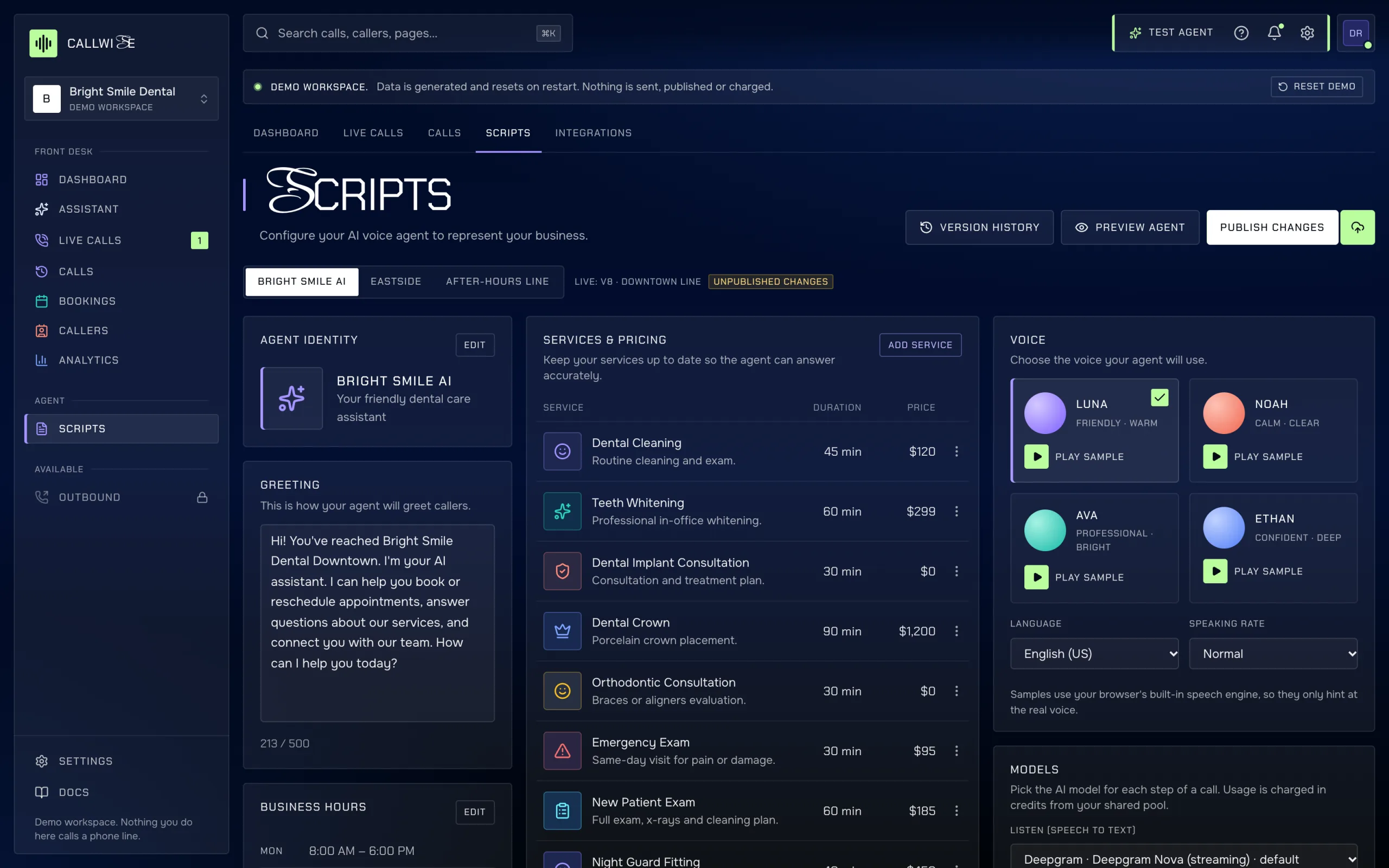
What a script contains
| Part | What you set |
|---|---|
| Agent identity | Name, tagline, avatar |
| Greeting | What the agent says first, up to 500 characters |
| Business hours | Hours per weekday and closed days; whether the agent answers 24/7 or only during hours (after-hours calls then go to voicemail) |
| Services and pricing | Name, description, duration and price per service. A price of $0 is read out as free. |
| Handoff rules | When to pass the caller to a person. See Handoff rules. |
| Voice | One of four voices, language and speaking rate |
| Models | One AI model per call step (listen, reply, speak, summarize), picked from the catalog in Scripts → Models; defaults preselected. Dearer models use more credits per minute. See AI models and credits. |
A workspace with more than one agent (for example one per location plus an after-hours line) has a picker at the top of the page.
Drafts
Every edit goes into the agent's draft. The live phone line keeps using the last published version until you publish. Anyone with edit on Receptionist can change the draft.
Testing
- Text test in the browser runs a conversation against the draft. Pick a scenario (book an appointment, ask about pricing, change an appointment) or type as the caller.
- Test number: call it to hear the draft. Not connected in this build.
Test calls are free and never count in analytics.
Publishing
Publish changes copies the draft into a new numbered version and points the agent at it. It needs publish on Receptionist. The database checks this in cw_publish_agent(); a member with edit gets an error even if they call the API directly.
Version history
Each version keeps who published it, when, a note and a summary of what changed. Restore as draft copies an old version back into the draft so you can review it and publish again. Versions themselves can't be edited or deleted.
Every call records the agent version it used, so you can tie a change in results to a script change.